✅ Check Aadhaar Bank Seeding Status instantly using UIDAI official portal.
🔍 Aadhaar Bank Seeding Status Check Online 2026
Are you looking to check whether your Aadhaar number is linked to your bank account? You can easily verify your Aadhaar Bank Seeding Status Check online using the official UIDAI portal.
“In this guide, you will learn how to perform Aadhaar Bank Seeding Status Check online step by step.”
Linking Aadhaar with your bank account is essential to receive DBT (Direct Benefit Transfer) benefits without delay.
✅ Why Aadhaar Bank Linking is Important
Receive DBT payments directly into your bank account
Required for government schemes like Anna Bhagya & Gruha Lakshmi
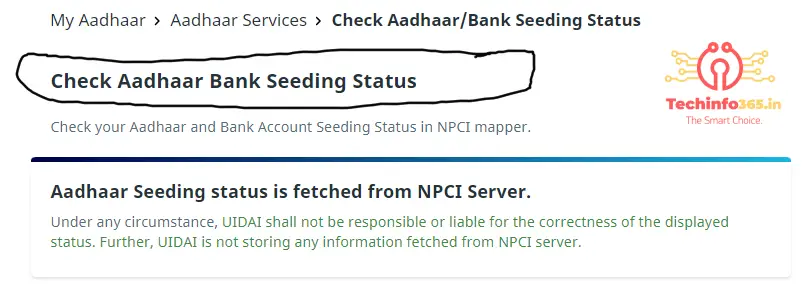
You will see: Aadhaar Seeding status is fetched from NPCI Server
Step 4:
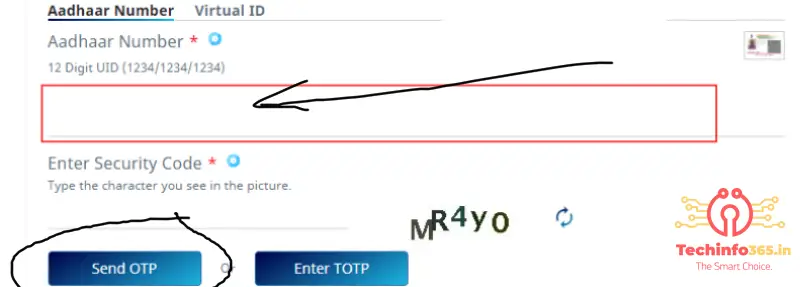
Enter your:
12-digit Aadhaar Number OR
16-digit Virtual ID
Step 5:
Enter Security Code (Captcha)
Step 6:
Click on Send OTP
Step 7:
Enter OTP received on your Aadhaar-linked mobile number
Step 8:
Click Submit
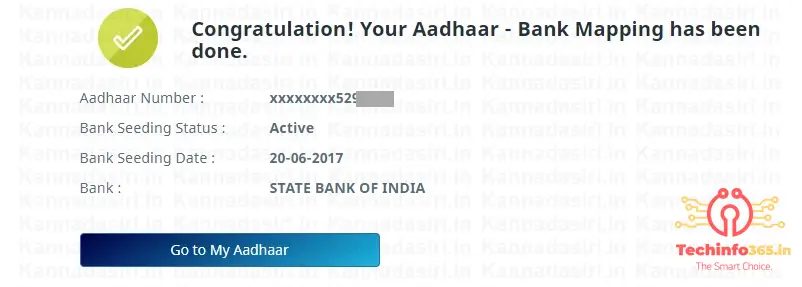
📊 Details You Will Get
Aadhaar linked bank name
Aadhaar bank mapping status
Seeding date
Status (Active / Inactive)
🔎 How to Know Which Bank is Linked with Aadhaar
Many users want to know which bank account is linked with their Aadhaar number. You can check this easily using the UIDAI bank mapper service.
When you complete the Aadhaar Bank Seeding Status Check process, it will show the bank name linked with your Aadhaar. This helps you identify where your DBT payments are being credited.
💡 Common Problems While Checking Aadhaar Status
Sometimes users face issues while checking Aadhaar bank seeding status. Here are common problems:
OTP not received
Mobile number not linked with Aadhaar
Server error from NPCI
Aadhaar not linked with bank
Solution:
Make sure your mobile number is updated in Aadhaar and try again after some time.
📱 Can You Check Aadhaar Bank Status on Mobile?
Yes, you can easily check Aadhaar Bank Seeding Status using your mobile phone.
Open UIDAI website
Enter Aadhaar number
Verify OTP
Check bank linking status instantly
This process works on both Android and iPhone devices.
🏦 How to Link Aadhaar with Bank Account
If your Aadhaar is not linked, follow these steps:
Visit your bank branch
Fill Aadhaar linking form
Submit Aadhaar copy
Link mobile number
Wait for confirmation
🔐 Is Aadhaar Bank Seeding Status Safe to Check Online?
Yes, checking your Aadhaar Bank Seeding Status Check online is completely safe when done through the official UIDAI website. The process requires OTP verification, which ensures that only the Aadhaar holder can access the information.
Always avoid using third-party or unknown websites to check your Aadhaar bank linking status, as they may not be secure.
1. How to check Aadhaar bank seeding status online? Visit UIDAI website, enter Aadhaar number, verify OTP, and check status.
2. What is Aadhaar bank seeding? It is linking Aadhaar with bank account for DBT benefits.
3. Why is Aadhaar linking important? To receive government benefits directly.
4. Can I check without OTP? No, OTP is required.
Ignore it :- how to check which bank is linked with aadhaar number,aadhaar bank seeding status check uidai gov in 2026,step by step aadhaar bank linking status check online,how to verify aadhaar bank mapping npcI server,aadhaar bank account link check for dbt payment,Techinfo365.in
Resize image to 50KB online free for SSC, UPSC, banking and job forms. Compress photo without losing quality using fast and secure tool.
Resize image to 50KB is one of the most common requirements for online job applications, government exams like SSC, banking forms, and other uploads. Many users face the error “image size too large” while submitting forms.
Resize Image to 50KB Online Free (SSC, UPSC, Job Forms)
Resize Image to 50KB Online Free (SSC, UPSC, Job Forms)
This happens because the uploaded image exceeds the allowed file size limit. In this guide, you will learn how to resize image to 50KB easily without losing quality.
How to Resize Image to 50KB
How to Resize Image to 50KB Why Image Size Matters Best Tools to Resize Image Tips to Maintain Quality Common Errors and Fixes FAQ
Why Resize Image to 50KB?
Many government and private websites require images under specific limits:
SSC photo size: 20KB – 50KB
Banking forms: under 50KB
Job portals: fixed upload size
How to Resize Image to 50KB
If your image is larger, your form will not be accepted.
Q: How do I resize image to 50KB online? A: Upload your image and use resize tool to reduce file size.
Q: Is it free? A: Yes, completely free.
Q: Is my image safe? A: Yes, processing happens in browser.
Q: Can I use mobile? A: Yes, works on all devices.
Conclusion
Resizing image to 50KB is essential for online forms and job applications. Using the right tool, you can quickly reduce image size without losing quality and avoid upload errors.
Resize Image to 50KB for SSC, UPSC & Online Forms Compress Image to 20KB for SSC Signature Upload
Resize Image to 50KB, 100KB for SSC, UPSC, Banking & Online Forms – Complete Guide
When filling out online forms for government jobs, exams, or other applications, many websites require you to upload a photo and signature in a specific file size such as 20KB, 50KB, or 100KB. Many users face problems because their image size is too large and the website shows an error like “Image size too large” or “Upload image under 50KB”. In this article, we will explain how to resize image to 50KB, resize image to 100KB, compress image, and create passport size photo for online forms.
Why Do Online Forms Require Specific Image Size?
Government exam forms like SSC, UPSC, Banking, Railways, Police, and other online applications require images in specific sizes to reduce server load and standardize document uploads. If your image size is not within the allowed limit, your form may be rejected or the upload will fail.
Common image size requirements: SSC Photo Size: 20KB to 50KB SSC Signature Size: 10KB to 20KB UPSC Photo Size: Up to 100KB Bank Photo Size: 20KB to 50KB Passport Photo Size: 3.5cm x 4.5cm
How to Resize Image to 50KB
If your image size is larger than 50KB, you need to compress and resize it. You can use an online tool to reduce image size easily. The resize image tool reduces the file size while maintaining image quality.
Steps:
Open Resize Image to 50KB tool
Upload your image
Click on resize button
Download resized image
How to Resize Image to 100KB
Some websites allow image size up to 100KB. In this case, you can use resize image to 100KB tool. This tool compresses the image and reduces file size to under 100KB.
How to Compress Image Online
Image compression reduces file size without changing image dimensions. Compression is useful when your image size is very large like 1MB or 2MB. After compressing, you can resize the image to required size like 50KB or 100KB.
Benefits of image compression: Faster upload Less storage space Website optimization Email attachment size reduction
Passport Size Photo for Online Forms
Many forms require passport size photo. Standard passport size photo dimensions are 3.5cm width and 4.5cm height. You can create passport size photo using an online passport photo maker tool.
Tips for passport size photo: Use plain white background Face should be clearly visible No sunglasses Photo should be recent
Convert Image to PDF for Document Upload
Some websites require documents in PDF format instead of image format. In that case, you can convert image to PDF using an online image to PDF converter tool.
Best Image Formats for Online Forms: JPG – Best for photos PNG – Best for signature PDF – Best for documents
Conclusion
Resizing and compressing images is very important for online job applications and exam forms. Many websites require images in specific sizes like 20KB, 50KB, or 100KB. Using online image tools, you can resize image, compress image, crop image, convert JPG to PNG, and convert image to PDF easily.
These tools are free to use and work on both mobile and desktop devices.
Voter ID download online is the easiest way to get your digital e-EPIC voter ID PDF without visiting any election office.
Downloading a Voter ID online is now very easy in India. The Government of India allows citizens to download their Digital Voter ID (e-EPIC) in PDF format using the official voter services portal and mobile app.
Many citizens prefer voter id download online because it is fast, secure, and completely government approved.
The Election Commission of India introduced e-EPIC to help voters access their voter ID instantly without visiting any office. This digital voter ID is 100% official, safe, and valid for voting and identity verification.
In this guide, you will learn how to download Voter ID online step by step, eligibility, mobile app method, password, common problems, FAQs, and SEO-optimized tips.
Voter ID download online helps citizens access their digital voter ID quickly without paperwork or office visits.
Millions of voters now prefer voter ID download online because it saves time and provides instant access to their official digital voter card.
e-EPIC stands for Electronic Electoral Photo Identity Card. It is the digital version of your physical voter ID card, provided in PDF format.
✅ Benefits of e-EPIC Voter ID
Official & government approved
Can be downloaded anytime
Easy to store on mobile
Accepted at polling stations
No risk of losing card
✅ Who Can Download Voter ID Online?
You can download your voter ID online if:
You are 18 years or older
Your name is included in the voter list
You have either:
EPIC number, or
Mobile number linked with voter ID
❌ You cannot download if:
Application is still under verification
Your voter record is incomplete
📄 Details Required for Voter ID Download
You do not need to upload any documents.
Keep ready:
EPIC number (if available)
Registered mobile number
Date of birth (for PDF password)
🌐 Voter ID Download Online – Step-by-Step Guide (e-EPIC PDF)
Follow these simple steps:
🪜 Step-by-Step Process
Open the official NVSP website
Click on Download e-EPIC
Enter EPIC number or mobile number
Receive and verify OTP
Click Download PDF
🎉 Your Voter ID PDF will be downloaded instantly.
📱 How to Download Voter ID Using Mobile App
You can also download your voter ID using the Voter Helpline App.
📲 Steps
Install Voter Helpline App
Login with mobile number
Verify OTP
Select e-EPIC Download
Save PDF on your phone
✔ Best option for mobile users ✔ Works on Android & iOS
🔐 Voter ID PDF Password
The downloaded PDF is password protected.
🔑 Password Format
DDMMYYYY
(Your Date of Birth)
Example: DOB: 12-03-2000 Password: 12032000
🔍 EPIC Number Not Found? Try This
If you forgot your EPIC number:
Use Search by Name
Enter:
Full name
Date of birth
State & constituency
✔ Use correct spelling for best results.
⚠️ Common Problems & Solutions
❌ OTP Not Received
✔ Check mobile network ✔ Retry after 5 minutes ✔ Ensure mobile is linked
❌ PDF Not Downloading
✔ Use Google Chrome ✔ Clear browser cache ✔ Try mobile app
❌ Wrong Details
✔ Submit correction request online ✔ Update official voter records
🆕 New Voter – How to Download Voter ID
If you recently applied:
Track application status
Once approved, EPIC is generated
Download e-EPIC using the same steps
⏱️ Approval time: 2–4 weeks
🔒 Is Digital Voter ID Valid?
✅ Yes, 100% valid
You can:
Show it on mobile
Carry printed PDF
Use it as identity proof
🆚 Physical vs Digital Voter ID
Feature
Physical
Digital (e-EPIC)
Easy to download
❌
✅
Backup copy
❌
✅
Government valid
✅
✅
Free
❌
✅
Why Voter ID Download Online Is Better Than Physical Card
FAQ
❓ How can I download my Voter ID online?
You can download your Voter ID online from the official NVSP website or the Voter Helpline App using your EPIC number or registered mobile number with OTP verification.
❓ Is digital Voter ID valid for voting?
Yes, the e-EPIC digital voter ID is fully valid and accepted at polling stations across India.
❓ What is the password to open the Voter ID PDF?
The password to open the Voter ID PDF file is your date of birth in DDMMYYYY format.
❓ Can I download voter ID without EPIC number?
Yes, you can download your voter ID by searching with your name, date of birth, state, and constituency details.
Cau Really Heping Techinfo365.in
Yes, Absolutly if u have any question kindly comment
Checking your PF (Provident Fund) balance in 2026 is simple and can be done online, through mobile apps, SMS, or even a missed call. The Employees’ Provident Fund Organisation (EPFO) has made it easier than ever for employees to track their savings anytime, anywhere.How To Check PF Balance in 2026
This guide explains all the latest methods to check PF balance in 2026, in easy language.
Give a missed call to 011-22901406 from your registered mobile number
You will receive an SMS with your latest PF balance details.
✔ Free of cost ✔ No login required
How to Check PF Balance via SMS
Format:
Send SMS to 7738299899
EPFOHO UAN ENG
You can replace ENG with regional languages like HIN, TAM, TEL, etc.
✔ Useful for basic balance info
How to Check PF Balance Without UAN
If you don’t know your UAN:
Ask your HR department
Check salary slip
Find UAN using Aadhaar or PAN on EPFO portal
Once you get UAN, activate it to check your PF balance easily.
Why You Should Check PF Balance Regularly
Ensure employer deposits are correct
Track interest credited
Plan withdrawals or transfers
Stay updated on retirement savings
Common Issues While Checking PF Balance
Mobile number not linked with UAN
UAN not activated
Incorrect login credentials
👉 These can be fixed by updating details on the EPFO portal.
Final Words
In 2026, checking your PF balance online is quick, secure, and hassle-free. Whether you use the EPFO portal, UMANG app, SMS, or missed call, staying updated with your PF savings helps you plan a better financial future.How To Check PF Balance in 2026,How To Check PF Balance in 2026,How To Check PF Balance in 2026.
Learn how to check PF balance in 2026 using UAN, EPFO portal, UMANG app, SMS, and missed call. Simple steps for all employees.
You can check your PF balance through the EPFO portal, UMANG app, SMS, or by giving a missed call from your registered mobile number.
2. Is UAN mandatory to check PF balance?
Yes, UAN is required for online PF balance check. However, missed call and SMS methods also work if your UAN is linked with your mobile number.
3. Can I check PF balance without logging in?
Yes, you can check your PF balance without login by using the missed call or SMS service.
4. What is the EPFO missed call number to check PF balance?
Give a missed call to 011-22901406 from your registered mobile number.
5. How to check PF balance using SMS?
Send SMS EPFOHO UAN ENG to 7738299899 from your registered mobile number.
6. Can I check PF balance on mobile?
Yes, you can check your PF balance easily using the UMANG app on your smartphone.
7. Is the UMANG app safe for PF balance check?
Yes, the UMANG app is a government-approved and secure platform for accessing EPFO services.
8. How often is PF balance updated?
PF balance is usually updated monthly after employer contributions are deposited.
9. Can I check PF balance if my UAN is not activated?
No, UAN activation is required for online PF balance checking.
10. What should I do if PF balance is not showing?
Ensure your UAN is activated, mobile number is linked, and employer has deposited the contribution.
11. Is Aadhaar mandatory to check PF balance?
Aadhaar is not mandatory for balance checking, but linking Aadhaar helps in faster services.
12. Can I check PF balance for old employers?
Yes, all PF accounts linked to your UAN will be visible in your EPFO passbook.
13. How to download PF passbook in 2026?
Log in to the EPFO portal or UMANG app and select View/Download Passbook.
14. Can I check PF balance at night or on holidays?
Yes, online and mobile methods work 24/7.
15. Is PF balance check free of cost?
Yes, checking PF balance through EPFO services is completely free.
16. Can I check PF balance if I changed my mobile number?
You must update your new mobile number in the EPFO portal to use SMS or missed call services.
17. What details are needed to check PF balance online?
You need your UAN and password for the EPFO portal or UMANG app.
18. Can I check PF balance in regional languages?
Yes, SMS service supports multiple regional languages like Hindi, Tamil, Telugu, and more.
19. How to find UAN if I forgot it?
You can find your UAN through the EPFO portal using Aadhaar, PAN, or by contacting your HR department.
20. Does PF balance include interest?
Yes, PF balance includes both contributions and interest earned.
21. Can retired employees check PF balance?
Yes, retired employees can check their PF balance until the account is settled.
22. Is PF balance shown in real-time?
PF balance is not real-time; it reflects the latest updated contributions.
23. What to do if employer PF contribution is missing?
You should contact your employer or raise a grievance on the EPFO portal.
24. Can I check PF balance without internet?
Yes, you can use SMS or missed call services without internet.
25. Why should I check PF balance regularly?
Regular checking helps track savings, verify employer contributions, and plan withdrawals.
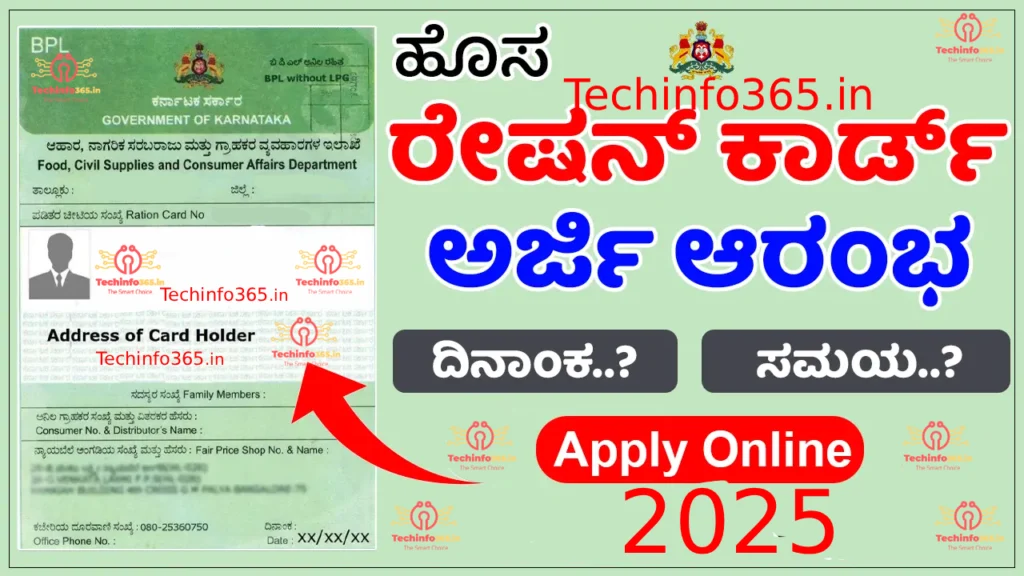
ಹೊಸ ರೇಶನ್ ಕಾರ್ಡ್ಗೆ ಹೇಗೆ ಸುಲಭವಾಗಿ ಅರ್ಜಿ ಸಲ್ಲಿಸಬಹುದು 2025 – ಸರಳ ಮಾರ್ಗದರ್ಶಿ | Techinfo365.in
Apply for a New Ration Card 2025 Techinfo365.in Apply New Ration Card 2025 ರೇಷನ್ ಕಾರ್ಡ್ಗಳು ಭಾರತದಲ್ಲಿ ಅಲ್ಪ ಆದಾಯದ ಕುಟುಂಬಗಳಿಗೆ ಆಹಾರ ಭದ್ರತೆಯನ್ನು ಖಾತ್ರಿಪಡಿಸುವಲ್ಲಿ ಮಹತ್ತರ ಪಾತ್ರವಹಿಸುತ್ತವೆ. ಇವುಗಳ ಮೂಲಕ ಫಲಾನುಭವಿಗಳು ಸಾರ್ವಜನಿಕ ವಿತರಣಾ ವ್ಯವಸ್ಥೆ (PDS) ಅಡಿಯಲ್ಲಿ ಅಕ್ಕಿ, ಗೋಧಿ, ಸಕ್ಕರೆ ಮತ್ತು ಕೇರೋಸಿನ್ ಮುಂತಾದ ಅವಶ್ಯಕ ವಸ್ತುಗಳನ್ನು ಸಬ್ಸಿಡಿ ದರದಲ್ಲಿ ಖರೀದಿಸಬಹುದು.
ಕರ್ನಾಟಕದಲ್ಲಿ ರಾಜ್ಯ ಸರ್ಕಾರವು ರೇಷನ್ ಕಾರ್ಡ್ ಅರ್ಜಿ ಪ್ರಕ್ರಿಯೆಯನ್ನು ಸರಳಗೊಳಿಸಿದೆ, zodat ನಾಗರಿಕರು ಸುಲಭವಾಗಿ ಮತ್ತು ಪಾರದರ್ಶಕವಾಗಿ ಅರ್ಜಿ ಸಲ್ಲಿಸಬಹುದು. ಈ ಸಂಪೂರ್ಣ ಮಾರ್ಗದರ್ಶಿಯಲ್ಲಿ ಕರ್ನಾಟಕದಲ್ಲಿ ಹೊಸ ರೇಷನ್ ಕಾರ್ಡ್ಗೆ ಹೇಗೆ ಅರ್ಜಿ ಸಲ್ಲಿಸಬೇಕು, ಅದರ ವಿಧಗಳು, ಅರ್ಹತಾ ಮಾನದಂಡಗಳು ಮತ್ತು ಅಗತ್ಯ ದಾಖಲೆಗಳ ಬಗ್ಗೆ ವಿವರಿಸಲಾಗಿದೆ.
🔹 ರೇಷನ್ ಕಾರ್ಡ್ ಎಂದರೇನು?
ರೇಷನ್ ಕಾರ್ಡ್ ಎಂದರೆ ಸರ್ಕಾರದಿಂದ ನೀಡಲ್ಪಡುವ ಅಧಿಕೃತ ದಾಖಲೆ ಆಗಿದ್ದು, ಇದರಿಂದ ಅರ್ಹ ಕುಟುಂಬಗಳು ಸಾರ್ವಜನಿಕ ವಿತರಣಾ ವ್ಯವಸ್ಥೆ (PDS) ಅಡಿಯಲ್ಲಿ ನ್ಯಾಯದರದ ಅಂಗಡಿಗಳಿಂದ (Fair Price Shops) ಸಬ್ಸಿಡಿ ಆಹಾರ ವಸ್ತುಗಳನ್ನು ಪಡೆಯಬಹುದು. ಇದು ವ್ಯಕ್ತಿಯ ಗುರುತಿನ ಪ್ರಮಾಣಪತ್ರ ಮತ್ತು ನಿವಾಸದ ದೃಢೀಕರಣವಾಗಿಯೂ ಕಾರ್ಯನಿರ್ವಹಿಸುತ್ತದೆ.
ಕರ್ನಾಟಕದಲ್ಲಿ ರೇಷನ್ ಕಾರ್ಡ್ಗಳನ್ನು ಮೂರು ವಿಭಾಗಗಳಲ್ಲಿ ವಿಂಗಡಿಸಲಾಗಿದೆ:
🟢 BPL (Below Poverty Line) – ಬಡತನ ರೇಖೆಗಿಂತ ಕೆಳಗಿನ ಕುಟುಂಬಗಳಿಗೆ.
🟡 APL (Above Poverty Line) – ಬಡತನ ರೇಖೆಗಿಂತ ಮೇಲಾಗಿರುವ ಕುಟುಂಬಗಳಿಗೆ.
🔹 ಕರ್ನಾಟಕದಲ್ಲಿ ರೇಷನ್ ಕಾರ್ಡ್ ಪಡೆಯಲು ಅರ್ಹತಾ ಮಾನದಂಡಗಳು
ಕರ್ನಾಟಕದ ನಿವಾಸಿಗಳು: ಅರ್ಜಿದಾರರು ಕರ್ನಾಟಕದ ಶಾಶ್ವತ ನಿವಾಸಿಯಾಗಿರಬೇಕು.
ಕಡಿಮೆ ಆದಾಯದ ಕುಟುಂಬಗಳು: BPL ಅಥವಾ APL ವರ್ಗದ ಕುಟುಂಬಗಳು ಅರ್ಹರಾಗಿರುತ್ತಾರೆ.
ಮಹಿಳೆಯರು ಮತ್ತು ವಿಧವೆಗಳು: ಕೆಲವು ಸಂದರ್ಭಗಳಲ್ಲಿ ಮಹಿಳೆಯರಿಗೆ, ವಿಶೇಷವಾಗಿ ವಿಧವೆಗಳಿಗೆ ಆದ್ಯತೆ ನೀಡಲಾಗುತ್ತದೆ.
ದುರ್ಬಲ ವರ್ಗಗಳು: ಅಂಗವಿಕಲರು, ಹಿರಿಯ ನಾಗರಿಕರು ಮತ್ತು ಹಿಂದುಳಿದ ಸಮುದಾಯದವರು ಸಹ ಅರ್ಹರು.
ಗಮನಿಸಿ: ಪ್ರತಿಯೊಂದು ಕುಟುಂಬಕ್ಕೂ ಒಂದೇ ರೇಷನ್ ಕಾರ್ಡ್ ನೀಡಲಾಗುತ್ತದೆ. ಕುಟುಂಬದ ಎಲ್ಲಾ ಸದಸ್ಯರ ವಿವರಗಳನ್ನು ಸರಿಯಾಗಿ ನಮೂದಿಸಬೇಕು. Apply for a New Ration Card 2025 Techinfo365.in Apply for a New Ration Card 2025 Techinfo365.in Apply for a New Ration Card 2025 Techinfo365.in
Apply for a New Ration Card 2025 Techinfo365.in
🔹 ಅಗತ್ಯ ದಾಖಲೆಗಳು (Documents Required)
ರೇಷನ್ ಕಾರ್ಡ್ಗೆ ಅರ್ಜಿ ಸಲ್ಲಿಸುವಾಗ ಕೆಳಗಿನ ದಾಖಲೆಗಳನ್ನು ನೀಡುವುದು ಅಗತ್ಯ:
ಗುರುತಿನ ಪ್ರಮಾಣಪತ್ರ: ಆಧಾರ್ ಕಾರ್ಡ್, ಮತದಾರರ ಗುರುತಿನ ಚೀಟಿ, ಪಾಸ್ಪೋರ್ಟ್ ಇತ್ಯಾದಿ.
ಆದಾಯ ಪ್ರಮಾಣಪತ್ರ: BPL ಅಥವಾ APL ವಿಭಾಗಕ್ಕೆ ಸೇರಿದವರು ಆದಾಯ ಪ್ರಮಾಣಪತ್ರ ಸಲ್ಲಿಸಬೇಕು.
ಫೋಟೋಗಳು: ಎಲ್ಲಾ ಪ್ರাপ্তವಯಸ್ಕ ಸದಸ್ಯರ ಪಾಸ್ಪೋರ್ಟ್ ಗಾತ್ರದ ಫೋಟೋಗಳು.
ಜಾತಿ ಪ್ರಮಾಣಪತ್ರ: SC/ST/OBC ವರ್ಗದವರಿಗೆ ಅಗತ್ಯ.
ನಿವಾಸದ ಪ್ರಮಾಣಪತ್ರ: ವಿದ್ಯುತ್ ಬಿಲ್, ನೀರಿನ ಬಿಲ್, ಬಾಡಿಗೆ ಒಪ್ಪಂದ ಅಥವಾ ಸ್ಥಳೀಯ ಸಂಸ್ಥೆಯಿಂದ ಪ್ರಮಾಣ ಪತ್ರ.
ಆಧಾರ್ ಕಾರ್ಡ್ ಲಿಂಕ್: ಎಲ್ಲಾ ಕುಟುಂಬ ಸದಸ್ಯರ ಆಧಾರ್ ಕಾರ್ಡ್ಗಳನ್ನು ರೇಷನ್ ಕಾರ್ಡ್ಗೆ ಲಿಂಕ್ ಮಾಡುವುದು ಅಗತ್ಯ.
🔹 ಆನ್ಲೈನ್ ಮೂಲಕ ರೇಷನ್ ಕಾರ್ಡ್ಗೆ ಅರ್ಜಿ ಸಲ್ಲಿಸುವ ವಿಧಾನ
ಕರ್ನಾಟಕ ಸರ್ಕಾರವು ಈಗ ಆನ್ಲೈನ್ ಮೂಲಕ ಹೊಸ ರೇಷನ್ ಕಾರ್ಡ್ಗೆ ಅರ್ಜಿ ಸಲ್ಲಿಸುವ ವ್ಯವಸ್ಥೆ ಒದಗಿಸಿದೆ.
📤 ಅಗತ್ಯ ದಾಖಲೆಗಳನ್ನು ಅಪ್ಲೋಡ್ ಮಾಡಿ ಮತ್ತು ಅರ್ಜಿ ಸಲ್ಲಿಸಿ.
🔍 ಅರ್ಜಿಯ ಸ್ಥಿತಿಯನ್ನು ಆನ್ಲೈನ್ನಲ್ಲಿ ಟ್ರ್ಯಾಕ್ ಮಾಡಿ.
🔹 ಅರ್ಜಿ ಸ್ಥಿತಿಯನ್ನು ಪರಿಶೀಲಿಸುವುದು
ಅರ್ಜಿ ಸಲ್ಲಿಸಿದ ನಂತರ, ನೀಡಲಾದ Application Number ಬಳಸಿ ಅದರ ಸ್ಥಿತಿಯನ್ನು ಆನ್ಲೈನ್ನಲ್ಲಿ ಪರಿಶೀಲಿಸಬಹುದು. ಪರಿಶೀಲನೆ ಯಶಸ್ವಿಯಾಗಿ ಪೂರ್ಣಗೊಂಡ ನಂತರ ರೇಷನ್ ಕಾರ್ಡ್ನ್ನು ನಿಮ್ಮ ನೋಂದಾಯಿತ ವಿಳಾಸಕ್ಕೆ ಕಳುಹಿಸಲಾಗುತ್ತದೆ.
🔹 ಸಾರಾಂಶ
ರೇಷನ್ ಕಾರ್ಡ್ ಕರ್ನಾಟಕದ ನಾಗರಿಕರಿಗೆ ಆಹಾರ ಭದ್ರತೆಯನ್ನು ಖಚಿತಪಡಿಸಲು ಪ್ರಮುಖ ದಾಖಲೆ. ಆನ್ಲೈನ್ ಮತ್ತು ಆಫ್ಲೈನ್ ಎರಡೂ ವಿಧಾನಗಳಲ್ಲಿ ಈಗ ಸುಲಭವಾಗಿ ಅರ್ಜಿ ಸಲ್ಲಿಸಬಹುದು. ಈ ಮಾರ್ಗದರ್ಶನವನ್ನು ಅನುಸರಿಸುವ ಮೂಲಕ ನೀವು 2025 ರ ಹೊಸ ರೇಷನ್ ಕಾರ್ಡ್ಗೆ ಸುಲಭವಾಗಿ ಅರ್ಜಿ ಸಲ್ಲಿಸಬಹುದು.
📌 ಗಮನಿಸಿ: ಅರ್ಜಿ ಸಲ್ಲಿಸುವ ಮೊದಲು ಎಲ್ಲಾ ದಾಖಲೆಗಳನ್ನು ನವೀಕರಿಸಿ ಮತ್ತು ಮಾಹಿತಿಯನ್ನು ಸರಿಯಾಗಿ ನಮೂದಿಸಿ.
Apply for a New Ration Card 2025 Techinfo365.in Apply for a New Ration Card 2025 Techinfo365.in Apply for a New Ration Card 2025 Techinfo365.in Apply for a New Ration Card 2025 Techinfo365.in Apply for a New Ration Card 2025 Techinfo365.in
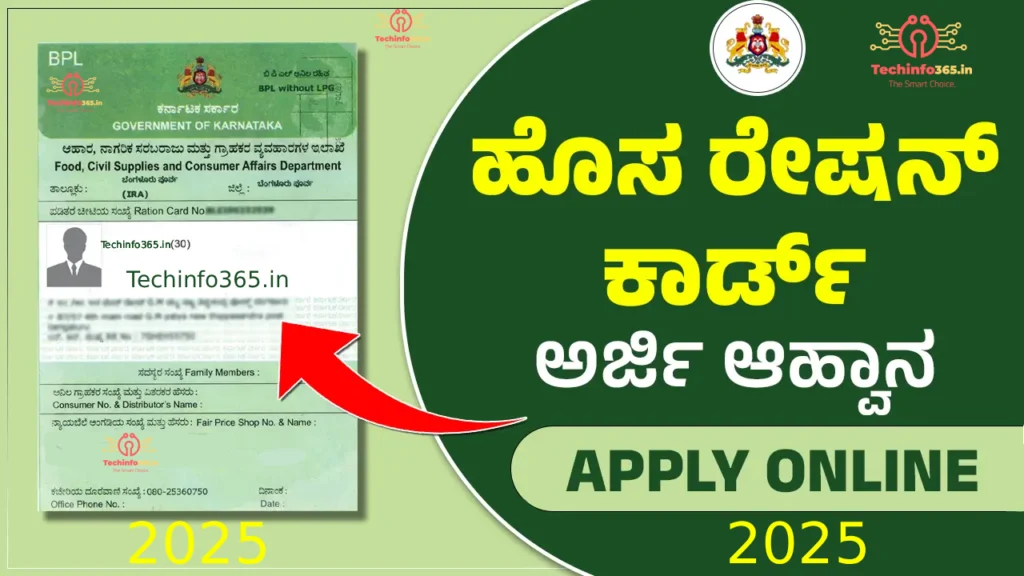
How to Easily Apply for a New Ration Card 2025 – Simple Guide | Techinfo365.in
Apply New Ration Card 2025 Ration cards play a crucial role in ensuring food security for low-income families in India. They allow beneficiaries to purchase essential commodities such as rice, wheat, sugar, and kerosene at subsidized rates through the Public Distribution System (PDS). In Karnataka, the state government has simplified the ration card application process to make it more accessible and transparent for eligible citizens. This comprehensive guide explains how to apply for a ration card in Karnataka, the types of ration cards available, the eligibility criteria, and the required documents to help you complete your application smoothly.
What is a Ration Card?
A ration card is an official document issued by the government to eligible households for purchasing subsidized food grains and essential commodities from Fair Price Shops (FPS) under the Public Distribution System (PDS). It acts as proof of identity and residence for individuals and families.
Below Poverty Line (BPL) Ration Card: Issued to families living below the poverty line.
Above Poverty Line (APL) Ration Card: Issued to families with a higher income than the BPL category.
Antyodaya Anna Yojana (AAY) Ration Card: Issued to the most marginalized and economically backward families, ensuring they receive food at highly subsidized rates.
Eligibility Criteria for Ration Card in Karnataka.Apply New Ration Card 2025
Before applying for a ration card, it is important to check the eligibility criteria. In Karnataka, the following groups can apply for a ration card:
Citizens of Karnataka: The applicant must be a resident of Karnataka.
Low-Income Families: Families that fall under the BPL or APL category can apply for a ration card.
Single and Widowed Women: Women, particularly widows, are given priority in some cases.
Vulnerable Groups: People with disabilities, elderly citizens, and marginalized communities are also eligible to apply.
Note:- that only one ration card is issued per family, and applicants must provide accurate details of family members.Apply New Ration Card 2025
Documents Required to Apply for a Ration Card in Karnataka
To apply for a ration card in Karnataka, applicants need to submit certain documents to verify their identity, residence, and eligibility. Commonly required documents include:
Apply New Ration Card 2025
Proof of Identity: Aadhar card, Voter ID, Passport, or any government-issued identity card.
Income Certificate: For BPL and APL categories, applicants need to submit an income certificate.
Photographs: Passport-sized photographs of all adult family members.
Caste Certificate: For applicants from reserved categories (SC/ST/OBC), a caste certificate is required.
Proof of Residence: Electricity bill, water bill, rent agreement, or a letter from the local municipal body.
Aadhar Card for all Family Members: Linking ration cards with Aadhar ensures better distribution and transparency.
How to Apply for a Ration Card in Karnataka
There are several methods available to apply for a ration card in Karnataka. Applicants can choose the option that suits them best.
Online Application Process For Apply New Ration Card 2025
The Karnataka government has made it convenient to apply for a ration card online. Here’s how you can apply: Apply New Ration Card 2025
Step 1: Visit the official Karnataka Food and Civil Supplies Department website: https://ahara.kar.nic.in.
Step 2: On the homepage, find the “Ration Card” section and click on “Apply for New Ration Card.”
Step 3: Create a user account if you don’t have one, or log in with your credentials if you already have an account.
Step 4: Fill out the online application form with accurate details of your family members and documents.
Step 5: Upload the required documents like identity proof, address proof, and income certificate.
Step 6: After filling out the form, submit the application. You will receive an application number for tracking the status of your application.
Offline Application Process For Apply New Ration Card 2025
For those who prefer to apply offline, you can visit the nearest Taluk Office or the Food and Civil Supplies Department office. Here’s how:
Step 1: Visit the nearest Taluk Office or Food and Civil Supplies office in your area.
Step 2: Collect the Ration Card application form.
Step 3: Fill in the form with all necessary details such as family members, address, and income.
Step 4: Attach the required documents, such as identity proof, address proof, and income certificate.
Step 5: Submit the application form along with the documents to the authorities for processing.
Through E-District Portal For Apply New Ration Card 2025
Another way to apply is through the Karnataka E-District portal. This portal allows you to apply for various services, including the ration card, in a few simple steps.
Step 3: Select the “Apply for Ration Card” option.
Step 4: Complete the application and upload the necessary documents.
Step 5: Submit the application and track the status online.
Status and Tracking of Ration Card Application Of Apply New Ration Card 2025
Once you’ve submitted your application, you can track the status of your ration card application online. Use the application number provided during the submission to check the current status of the processing. The ration card will be delivered to your registered address once the verification is completed successfully.
Conclusion Of Apply New Ration Card 2025
A ration card is a crucial document for ensuring access to subsidized food and other benefits under the Public Distribution System (PDS) in Karnataka. With the online and offline application options available, the process of applying for a ration card has been made easier for citizens. By following the guidelines provided, you can apply for a new ration card in Karnataka and access the benefits of food security in a hassle-free manner.
Remember to keep all your documents up to date and verify your details before submitting your application to avoid any issues in the process.
Apply New Ration Card 2025 Apply New Ration Card 2025 Apply New Ration Card 2025 Apply New Ration Card 2025 Apply New Ration Card 2025 Apply New Ration Card 2025 Apply New Ration Card 2025 Apply New Ration Card 2025 Apply New Ration Card 2025 Apply New Ration Card 2025 Apply New Ration Card 2025 Apply New Ration Card 2025.How to Easily Apply for a New Ration Card 2025 – Simple Guide | Techinfo365.in
Top 10 Free AI Tools You Should Use in 2025 to Save Time and Make Money Online
top-10-free-ai-tools-2025 Discover the top 10 free AI tools of 2025 to boost your productivity, create amazing content, and earn money online. Explore AI websites like ChatGPT, Canva AI, and Runway ML for writing, design, and automation.
Top 10 Free AI Tools in 2025 to Save Time and Make Money Online Technology AI 2025
💡 Introduction
Artificial Intelligence (AI) is no longer a futuristic dream — it’s the engine that powers today’s digital transformation. From students to startup founders, everyone is leveraging AI tools to simplify work, boost productivity, and create online income streams.
Top 10 Free AI Tools in 2025 to Save Time and Make Money Online Technology AI 2025
In 2025, AI technology has reached a new level. It’s not just about chatbots or writing assistants anymore — we now have AI tools that design graphics, generate full videos, write blog posts, build websites, and even speak in human-like voices.
If you’re looking to save time, learn new skills, or start an online business, these 10 free AI tools can help you make that happen. Each one is unique, beginner-friendly, and powerful enough to turn your ideas into results.
Let’s explore the Top 10 Free AI Tools of 2025 that you can use today!
Best for: Writing, brainstorming ideas, coding help, and productivity tasks.
ChatGPT continues to dominate the AI space in 2025. Developed by OpenAI, this conversational AI tool can understand and respond to almost any question you ask. You can use it to write blog posts, scripts, emails, SEO descriptions, code snippets, or even social media captions.
ChatGPT’s GPT-5 model now provides more accurate, creative, and human-like responses. It also integrates with external apps and plugins, allowing you to connect with tools like Canva, Google Sheets, and Zapier for automation.
💡 Pro Tip: Bloggers and freelancers use ChatGPT to create content faster, write product reviews, and optimize articles for SEO — saving hours every week.
💰 Earning Idea: Offer “AI Content Writing” gigs on Fiverr or Upwork and deliver professional blogs or ad copies in minutes.
Best for: Graphic design, content creation, and branding.
Canva has always been the go-to design platform for non-designers. But with the launch of Canva Magic Studio, it has become a complete AI-powered creative suite.
Canva’s AI tools can:
Generate images from text prompts
Automatically resize designs for different social media platforms
Suggest color palettes and layouts
Remove or replace backgrounds instantly
With its drag-and-drop interface, you can create Instagram posts, YouTube thumbnails, business logos, and even marketing videos — all in minutes.
💡 Pro Tip: Use Canva AI to build content calendars or create branded visuals for clients. 💰 Earning Idea: Promote Canva Pro as an affiliate or sell custom design templates on Etsy or Gumroad.
Runway ML is changing how creators edit videos. Instead of spending hours in software like Premiere Pro, Runway allows you to edit videos just by typing what you want.
For example:
“Remove background from this clip.”
“Make the lighting brighter.”
“Add cinematic color grading.”
Runway’s text-to-video generator can even create full clips from simple text prompts, making it perfect for YouTubers, social media creators, and marketers.
💰 Earning Idea: Offer short-form video creation services for Reels and TikToks using Runway ML.
Pika Labs allows you to create stunning AI videos from just a line of text. Type something like “a futuristic city skyline at sunset”, and it generates a full animated clip.
It’s a perfect tool for:
YouTubers creating intros
Digital marketers producing ad visuals
Artists experimenting with motion design
💰 Earning Idea: Create AI-generated stock videos or short animations and sell them on platforms like Shutterstock or Pond5.
Durable AI is like having a full-time web developer — but faster and cheaper. Simply enter your business name and a short description, and Durable creates a complete, SEO-ready website in under a minute.
It includes:
Copywriting
Layout
Contact forms
Professional images
💡 Pro Tip: Offer “AI Website Setup” services for local businesses. You can create and sell websites in minutes!
💰 Earning Idea: Create demo websites and pitch them to small business owners (restaurants, salons, shops).
You don’t have to be a tech genius to earn with AI. Here’s how everyday people are monetizing these tools in 2025:
Freelancing: Offer AI-powered writing, design, or video editing services on Fiverr, Upwork, or Freelancer.
Affiliate Marketing: Promote AI tools like Jasper, Writesonic, or Canva Pro on your website or YouTube.
Blogging & YouTube: Use AI to generate SEO articles, reels, and scripts faster.
Online Courses: Teach others how to use AI tools and sell your tutorials.
Automation Services: Help small businesses save time using AI chatbots and workflow automations.
🔍 SEO Keywords
free AI tools 2025, best AI tools for content creation, AI tools to make money online, top AI websites, free AI for business, AI tools for students, new AI apps 2025
📝 Meta Description
Discover the top 10 free AI tools of 2025 to boost productivity, create stunning content, and make money online. Learn how ChatGPT, Canva AI, and other tools can transform your workflow.
🏷️ Tags
AI tools, free AI software, technology, productivity, content creation, online earning, Canva AI, ChatGPT, AI 2025, blogging tools
⚡ Final Thoughts
AI is the ultimate digital assistant — always learning, always improving. Those who embrace it now will stay ahead in every industry. Whether you’re a student trying to save time, a freelancer looking for new income streams, or a creator building your personal brand — AI tools can help you grow faster.
Start experimenting with these free AI platforms today. The more you explore, the more you’ll discover ways to automate work, boost creativity, and make consistent income in 2025.
TruAlt Bioenergy’s much-anticipated IPO is creating buzz in the markets as grey market premiums (GMP) point to potentially strong listing gains. In this article, Techinfo365.in brings you the latest updates on subscription status, GMP trends, issue details, and key risks to watch.
Check out TruAlt Bioenergy IPO GMP aka IPO Grey Market Premium, Kostak rates, and Subject to Sauda rates as of today. TruAlt Bioenergy IPO GMP is started in grey market. Stay tuned for the latest IPO GMP numbers of TruAlt Bioenergy IPO.
TruAlt Bioenergy IPO GMP made a high of ₹94 on 29th September against the low of ₹55 on 23rd September.
TruAlt Bioenergy IPO is to open on September 25, 2025. It is a Mainline IPO that will raise ₹839.28 crores. The TruAlt Bioenergy IPO price band is fixed at ₹472 to ₹496 with a market lot of 30 Shares.
TruAlt Bioenergy IPO GMP Live Rates day by day with Kostak rates.
TruAlt Bioenergy IPO Details
IPO Open Date
September 25, 2025
IPO Close Date
September 29, 2025
Face Value
₹10 Per Equity Share
IPO Price Band
₹472 to ₹496 Per Share
Issue Size
Approx ₹839.28 Crores
Fresh Issue
Approx ₹750 Crores
Offer for Sale:
Approx 18,00,000 Equity Shares
Issue Type
Book Built Issue
IPO Listing
BSE, NSE
TruAlt Bioenergy IPO Dates
IPO Open Date:
September 25, 2025
IPO Close Date:
September 29, 2025
Basis of Allotment:
September 30, 2025
Refunds:
October 1, 2025
Credit to Demat Account:
October 1, 2025
IPO Listing Date:
October 3, 2025
IPO Bidding Cut-off Time:
September 29, 2025 – 5 PM
Business Overview
TruAlt Bioenergy is one of the leading companies in terms of providing biofuel, and they have a strong focus on Ethanol. Moreover, they have built a strong and diverse presence in the biofuels industry. Furthermore, they also have an aim to expand Ethanol production by 600 KLPD at three locations.
Apart from Ethanol, they also produce Extra Neutral Alcohol (ENA), which is mainly used to make alcohol drinks. Moreover, they also have dry ice and liquid carbon dioxide (CO2) as by-products of the Ethanol production process. Furthermore, In order to increase their production capacity, the company has spent ₹14,278.41 lakhs. In fact, they also have a loan approval of up to ₹1,93,197.00 lakhs from the Central Government under the Ethanol Interest Subvention Schemes to support this expansion. The company also has unique strengths, like interested promoters, along with experienced.
IPO Grey Market Premium (TruAlt Bioenergy IPO GMP) mention is valid for the specific date as mentioned in the header.
We are not buying and selling IPO forms on IPO Grey Market.
Kostak Rate is the premium one gets by selling his/her IPO application (in an off-market transaction) to someone else even before allotment or listing of the issue.
Do not subscribe for IPO by just seeing the premium Price as it may change anytime before listing. Subscribe only considering the fundamentals of the companies.
Conclusion
The GMP signals optimism for TruAlt Bioenergy IPO, suggesting healthy listing gains in the range of 20%+. However, investors should base decisions on allotment outcome, final demand data, and overall market conditions — not GMP alone. Techinfo365.in will continue to track updates, allotment status, and listing performance and bring you real-time analysis.
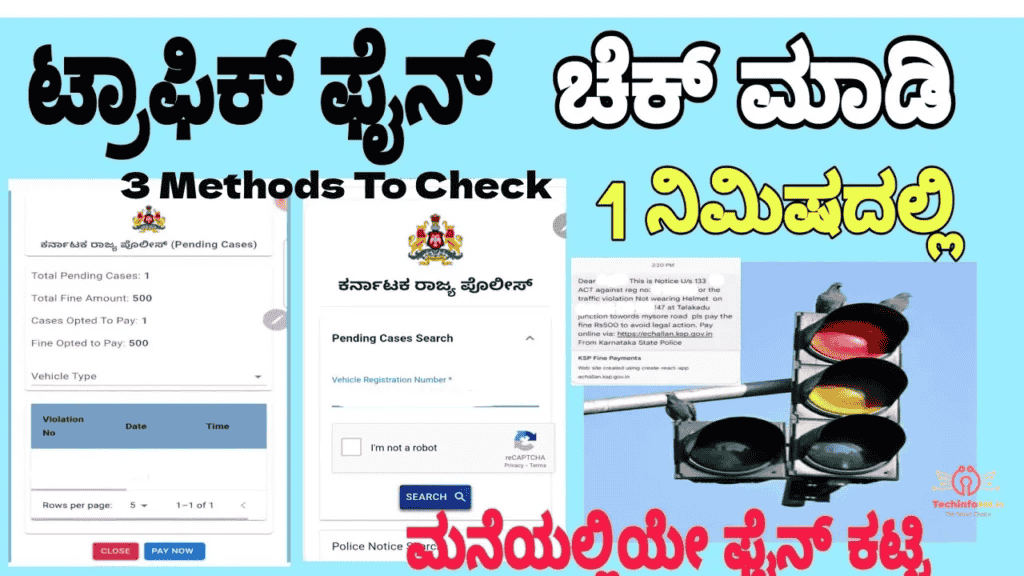
How to Check and Pay Karnataka Traffic Fines Online – 3 Methods techinfo365.in
How to Check and Pay Karnataka Traffic Fines Online – 3 Methods techinfo365.in
How to Check and Pay Karnataka Traffic Fines Online – 3 Methods techinfo365.in Karnataka traffic fines online,How to check Karnataka traffic challan,Pay traffic fines Karnataka,KarnatakaOne traffic payment,Parivahan e-challan Karnataka,Karnataka traffic rules and fines,Online challan payment in Karnataka,Paytm traffic fine payment Karnataka,Karnataka traffic violation check,Karnataka traffic fine waiver 2025,
Learn how to check and pay Karnataka traffic fines online through Parivahan, KarnatakaOne, and Paytm. Get up to 50% fine waiver in 2025. Step-by-step guide included.
Paying traffic fines in Karnataka has never been easier! Citizens now have multiple official portals to check and clear their challans. Whether you’re in Bengaluru, Mysuru, Mangaluru, Belagavi, or Hubballi-Dharwad, you can pay your dues online through Karnataka One, Bangalore One, and KSP Fines portal.
How to Check and Pay Karnataka Traffic Fines Online – 3 Easy Methods
Have you received a traffic challan in Karnataka? Don’t worry—checking and paying traffic fines has become much easier with online portals. Now, motorists in Bengaluru, Mysuru, Mangaluru, Belagavi, and Hubballi-Dharwad can clear their pending challans quickly.
Here’s a step-by-step guide to 3 methods you can use to check and pay your fines from the comfort of your home.
🔹 Method 1: Karnataka One Portal
Karnataka One is the statewide online service portal where citizens can pay various utility bills and government dues.
ಕರ್ನಾಟಕದಲ್ಲಿ ಸಂಚಾರ ದಂಡ ಪಾವತಿಸುವುದು ಹಿಂದೆಂದಿಗಿಂತಲೂ ಸುಲಭವಾಗಿತ್ತು! ನಾಗರಿಕರು ಈಗ ತಮ್ಮ ಚಲನ್ಗಳನ್ನು ಪರಿಶೀಲಿಸಲು ಮತ್ತು ತೆರವುಗೊಳಿಸಲು ಬಹು ಅಧಿಕೃತ ಪೋರ್ಟಲ್ಗಳನ್ನು ಹೊಂದಿದ್ದಾರೆ. ನೀವು ಬೆಂಗಳೂರು, ಮೈಸೂರು, ಮಂಗಳೂರು, ಬೆಳಗಾವಿ ಅಥವಾ ಹುಬ್ಬಳ್ಳಿ-ಧಾರವಾಡದಲ್ಲಿದ್ದರೂ, ನೀವು ಕರ್ನಾಟಕ ಒನ್, ಬೆಂಗಳೂರು ಒನ್ ಮತ್ತು ಕೆಎಸ್ಪಿ ದಂಡ ಪೋರ್ಟಲ್ ಮೂಲಕ ನಿಮ್ಮ ಬಾಕಿಗಳನ್ನು ಆನ್ಲೈನ್ನಲ್ಲಿ ಪಾವತಿಸಬಹುದು.
ಕರ್ನಾಟಕ ಸಂಚಾರ ದಂಡವನ್ನು ಆನ್ಲೈನ್ನಲ್ಲಿ ಪರಿಶೀಲಿಸುವುದು ಮತ್ತು ಪಾವತಿಸುವುದು ಹೇಗೆ – 3 ಸುಲಭ ವಿಧಾನಗಳು
ಕರ್ನಾಟಕದಲ್ಲಿ ನೀವು ಟ್ರಾಫಿಕ್ ಚಲನ್ ಸ್ವೀಕರಿಸಿದ್ದೀರಾ? ಚಿಂತಿಸಬೇಡಿ—ಆನ್ಲೈನ್ ಪೋರ್ಟಲ್ಗಳೊಂದಿಗೆ ಸಂಚಾರ ದಂಡವನ್ನು ಪರಿಶೀಲಿಸುವುದು ಮತ್ತು ಪಾವತಿಸುವುದು ಹೆಚ್ಚು ಸುಲಭವಾಗಿದೆ. ಈಗ, ಬೆಂಗಳೂರು, ಮೈಸೂರು, ಮಂಗಳೂರು, ಬೆಳಗಾವಿ ಮತ್ತು ಹುಬ್ಬಳ್ಳಿ-ಧಾರವಾಡದಲ್ಲಿನ ವಾಹನ ಚಾಲಕರು ತಮ್ಮ ಬಾಕಿ ಇರುವ ಚಲನ್ಗಳನ್ನು ತ್ವರಿತವಾಗಿ ತೆರವುಗೊಳಿಸಬಹುದು.
ನಿಮ್ಮ ಮನೆಯ ಸೌಕರ್ಯದಿಂದ ನಿಮ್ಮ ದಂಡವನ್ನು ಪರಿಶೀಲಿಸಲು ಮತ್ತು ಪಾವತಿಸಲು ನೀವು ಬಳಸಬಹುದಾದ 3 ವಿಧಾನಗಳ ಹಂತ-ಹಂತದ ಮಾರ್ಗದರ್ಶಿ ಇಲ್ಲಿದೆ.
🔹 ವಿಧಾನ 1: ಕರ್ನಾಟಕ ಒನ್ ಪೋರ್ಟಲ್
ಕರ್ನಾಟಕ ಒನ್ ರಾಜ್ಯವ್ಯಾಪಿ ಆನ್ಲೈನ್ ಸೇವಾ ಪೋರ್ಟಲ್ ಆಗಿದ್ದು, ಅಲ್ಲಿ ನಾಗರಿಕರು ವಿವಿಧ ಯುಟಿಲಿಟಿ ಬಿಲ್ಗಳು ಮತ್ತು ಸರ್ಕಾರಿ ಬಾಕಿಗಳನ್ನು ಪಾವತಿಸಬಹುದು.
ಕರ್ನಾಟಕ ಒನ್ ಮೂಲಕ ಪಾವತಿಸಲು ಹಂತಗಳು:
👉 ಕರ್ನಾಟಕ ಒನ್ ಪೋರ್ಟಲ್ಗೆ ಹೋಗಿ.
ಆನ್ಲೈನ್ ಸೇವೆಗಳನ್ನು ಆಯ್ಕೆಮಾಡಿ → ಸಂಚಾರ ಉಲ್ಲಂಘನೆ ದಂಡ ಪಾವತಿ.
ನಿಮ್ಮ ವಾಹನ ನೋಂದಣಿ ಸಂಖ್ಯೆ / ಚಲನ್ ಸಂಖ್ಯೆಯನ್ನು ನಮೂದಿಸಿ.
ಬಾಕಿ ಇರುವ ದಂಡಗಳನ್ನು ವೀಕ್ಷಿಸಿ ಮತ್ತು ಆನ್ಲೈನ್ ಪಾವತಿಯೊಂದಿಗೆ ಮುಂದುವರಿಯಿರಿ (UPI, ಡೆಬಿಟ್/ಕ್ರೆಡಿಟ್ ಕಾರ್ಡ್, ನೆಟ್ ಬ್ಯಾಂಕಿಂಗ್).
ಬೆಂಗಳೂರು ಒನ್ ಕೇಂದ್ರಗಳು ಮತ್ತು ವೆಬ್ಸೈಟ್ ಬೆಂಗಳೂರು ನಗರದ ನಿವಾಸಿಗಳು ಆನ್ಲೈನ್ ಮತ್ತು ಆಫ್ಲೈನ್ನಲ್ಲಿ ಬಾಕಿ ಇರುವ ದಂಡವನ್ನು ಪಾವತಿಸಲು ಅನುವು ಮಾಡಿಕೊಡುತ್ತದೆ.
ಬೆಂಗಳೂರು ಒನ್ ಮೂಲಕ ಪಾವತಿಸಲು ಹಂತಗಳು:
👉 ಬೆಂಗಳೂರು ಒನ್ ಪೋರ್ಟಲ್ಗೆ ಭೇಟಿ ನೀಡಿ.
ಸಂಚಾರ ಉಲ್ಲಂಘನೆ ದಂಡ ಪಾವತಿಯನ್ನು ಆಯ್ಕೆಮಾಡಿ.
ವಾಹನ ನೋಂದಣಿ ಸಂಖ್ಯೆಯನ್ನು ನಮೂದಿಸಿ.
ಚಲನ್ ವಿವರಗಳನ್ನು ಪರಿಶೀಲಿಸಿ ಮತ್ತು ಆನ್ಲೈನ್ನಲ್ಲಿ ಪಾವತಿಸಿ.
ಪರ್ಯಾಯವಾಗಿ, ನೀವು ಬೆಂಗಳೂರು ಒನ್ ಭೌತಿಕ ಕೇಂದ್ರಕ್ಕೆ ಭೇಟಿ ನೀಡಿ ಕೌಂಟರ್ನಲ್ಲಿ ಪಾವತಿಸಬಹುದು.
#KarnatakaTrafficFines
#eChallan
#OnlinePayment
#KarnatakaOne
#Paytm
#VehicleChallan
#RoadSafety
#GovernmentPortal
#TrafficViolation
#50PercentFineWaiver
#DigitalPayments
#KarnatakaNews
#TransportServices
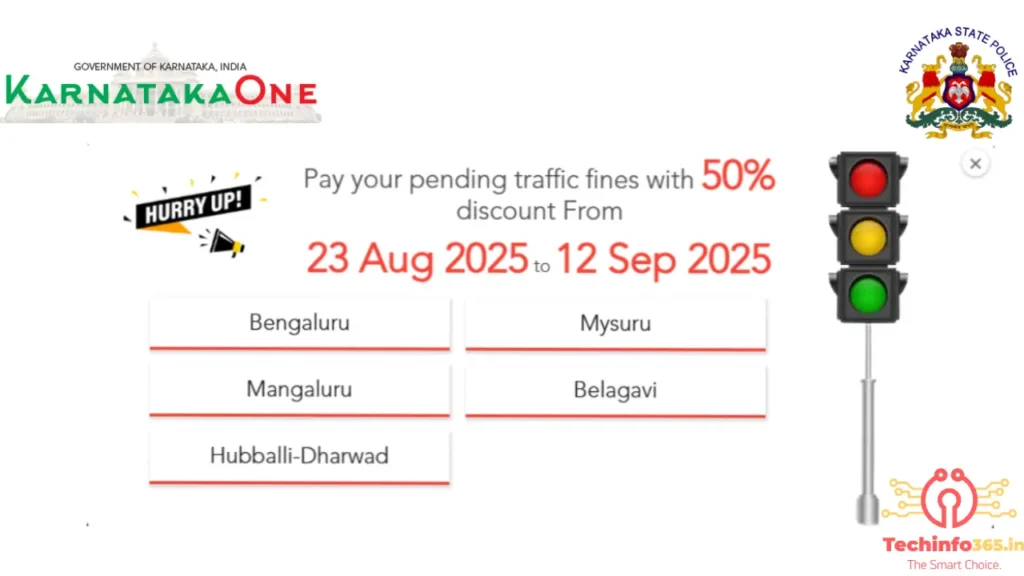
Hurry Up! 50% Discount on Pending Traffic Fines in Karnataka 🚦
Great news for motorists in Karnataka! The state traffic police have announced a special drive to help citizens clear their pending traffic fines at a 50% discount. This limited-time offer is valid from:
50% Discount on Karnataka Traffic Fines – Aug-Sep 2025
Clear Pending Traffic Fines with 50% Off in Karnataka
Pay Traffic Challans at Half Price – Karnataka 2025
Karnataka Traffic Fine Discount Offer – Aug 23 to Sep 12
📅 23rd August 2025 to 12th September 2025
Cities Covered Under the Offer:
Bengaluru
Mysuru
Mangaluru
Belagavi
Hubballi-Dharwad
If you have pending challans, this is the perfect opportunity to settle them at half the cost and avoid future legal or financial complications.
Why This Initiative?
The initiative aims to:
Reduce the backlog of unpaid traffic fines.
Encourage citizens to comply with road safety rules.
Provide financial relief to motorists.
Why You Shouldn’t Miss This Offer
Save Money: Pay only half of your dues.
Avoid Penalties: Non-payment can lead to added penalties or legal action.
Peace of Mind: Clear your record and drive stress-free.
🚨 Important Note: This discount window is available only until 12th September 2025. Don’t wait until the last day—clear your dues today and take advantage of this golden chance!
Activate PF UAN Using Mobile | Techinfo365.in
“EPFO (Employees’ Provident Fund Organisation) manages retirement savings for employees in India. It allows employees to track their PF balance, withdraw funds, and transfer accounts online. With a UAN (Universal Account Number), users can easily access their EPF details, check passbooks, and claim benefits. Learn how to activate your UAN, check your balance, and manage your EPF account effortlessly. Stay updated with the latest EPFO rules and benefits on Techinfo365.in!”
Advertisement Activate PF UAN Using Mobile | Techinfo365.in
Advertisement
Activate PF UAN Using Mobile | Techinfo365.in Activate PF UAN Using Mobile | Techinfo365.in
“EPFO (Employees’ Provident Fund Organisation) manages retirement savings for employees in India. It allows employees to track their PF balance, withdraw funds, and transfer accounts online. With a UAN (Universal Account Number), users can easily access their EPF details, check passbooks, and claim benefits. Learn how to activate your UAN, check your balance, and manage your EPF account effortlessly. Stay updated with the latest EPFO rules and benefits on Techinfo365.in!”