
🔍 Aadhaar Bank Seeding Status Check Online 2026
Are you looking to check whether your Aadhaar number is linked to your bank account? You can easily verify your Aadhaar Bank Seeding Status Check online using the official UIDAI portal.
Thank you for reading this post, don't forget to subscribe!“In this guide, you will learn how to perform Aadhaar Bank Seeding Status Check online step by step.”
Linking Aadhaar with your bank account is essential to receive DBT (Direct Benefit Transfer) benefits without delay.

✅ Why Aadhaar Bank Linking is Important
- Receive DBT payments directly into your bank account
- Required for government schemes like Anna Bhagya & Gruha Lakshmi
- Ensures fast subsidy transfer
- Secure identity verification
🪜 How to Check Aadhaar Bank Seeding Status Online
Step 1:
Visit the official UIDAI website:
👉 https://resident.uidai.gov.in
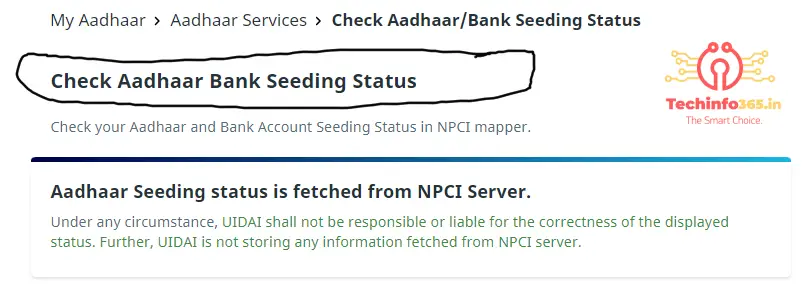
Step 2:
Click on “Check Aadhaar Bank Seeding Status”
Step 3:
You will see: Aadhaar Seeding status is fetched from NPCI Server
Step 4:
Enter your:
- 12-digit Aadhaar Number OR
- 16-digit Virtual ID
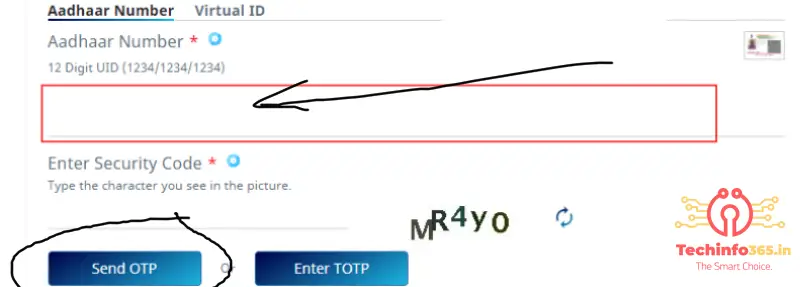
Step 5:
Enter Security Code (Captcha)
Step 6:
Click on Send OTP
Step 7:
Enter OTP received on your Aadhaar-linked mobile number
Step 8:
Click Submit
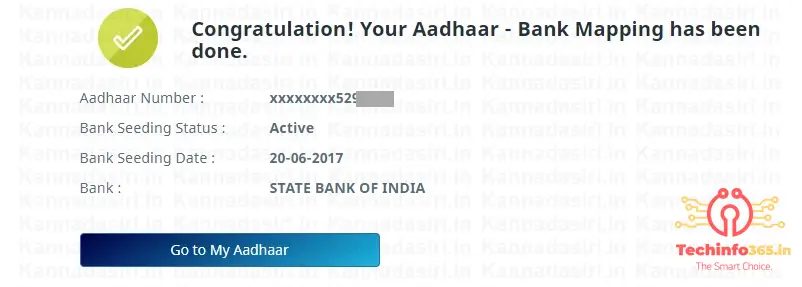
📊 Details You Will Get
- Aadhaar linked bank name
- Aadhaar bank mapping status
- Seeding date
- Status (Active / Inactive)
🔎 How to Know Which Bank is Linked with Aadhaar
Many users want to know which bank account is linked with their Aadhaar number. You can check this easily using the UIDAI bank mapper service.
When you complete the Aadhaar Bank Seeding Status Check process, it will show the bank name linked with your Aadhaar. This helps you identify where your DBT payments are being credited.
💡 Common Problems While Checking Aadhaar Status
Sometimes users face issues while checking Aadhaar bank seeding status. Here are common problems:
- OTP not received
- Mobile number not linked with Aadhaar
- Server error from NPCI
- Aadhaar not linked with bank
Solution:
Make sure your mobile number is updated in Aadhaar and try again after some time.
📱 Can You Check Aadhaar Bank Status on Mobile?
Yes, you can easily check Aadhaar Bank Seeding Status using your mobile phone.
- Open UIDAI website
- Enter Aadhaar number
- Verify OTP
- Check bank linking status instantly
This process works on both Android and iPhone devices.
🏦 How to Link Aadhaar with Bank Account
If your Aadhaar is not linked, follow these steps:
- Visit your bank branch
- Fill Aadhaar linking form
- Submit Aadhaar copy
- Link mobile number
- Wait for confirmation
🔐 Is Aadhaar Bank Seeding Status Safe to Check Online?
Yes, checking your Aadhaar Bank Seeding Status Check online is completely safe when done through the official UIDAI website. The process requires OTP verification, which ensures that only the Aadhaar holder can access the information.
Always avoid using third-party or unknown websites to check your Aadhaar bank linking status, as they may not be secure.
🚀 Benefits of Aadhaar Bank Seeding Status Check
- Quick verification of bank linking
- Helps track DBT payments
- Avoids payment failure issues
- Saves time without visiting bank
- Ensures correct bank account mapping
🔗 Important Links
❌ What If Aadhaar is Not Linked?
- Visit your bank branch
- Request Aadhaar linking
- Submit Aadhaar & bank details
❓ FAQ
1. How to check Aadhaar bank seeding status online?
Visit UIDAI website, enter Aadhaar number, verify OTP, and check status.
2. What is Aadhaar bank seeding?
It is linking Aadhaar with bank account for DBT benefits.
3. Why is Aadhaar linking important?
To receive government benefits directly.
4. Can I check without OTP?
No, OTP is required.
Ignore it :- how to check which bank is linked with aadhaar number,aadhaar bank seeding status check uidai gov in 2026,step by step aadhaar bank linking status check online,how to verify aadhaar bank mapping npcI server,aadhaar bank account link check for dbt payment,Techinfo365.in
also check out this :- Reduce Image Size To KB